
Connecting Input Datasources
An input datasource is one logical source of sensor data — an OPC-UA endpoint, an MQTT topic group, a CSV replay file, and so on. Each source is a typed adapter with its own connection settings and tag list. You map its tags to your model’s input channels, then run it through a flow.
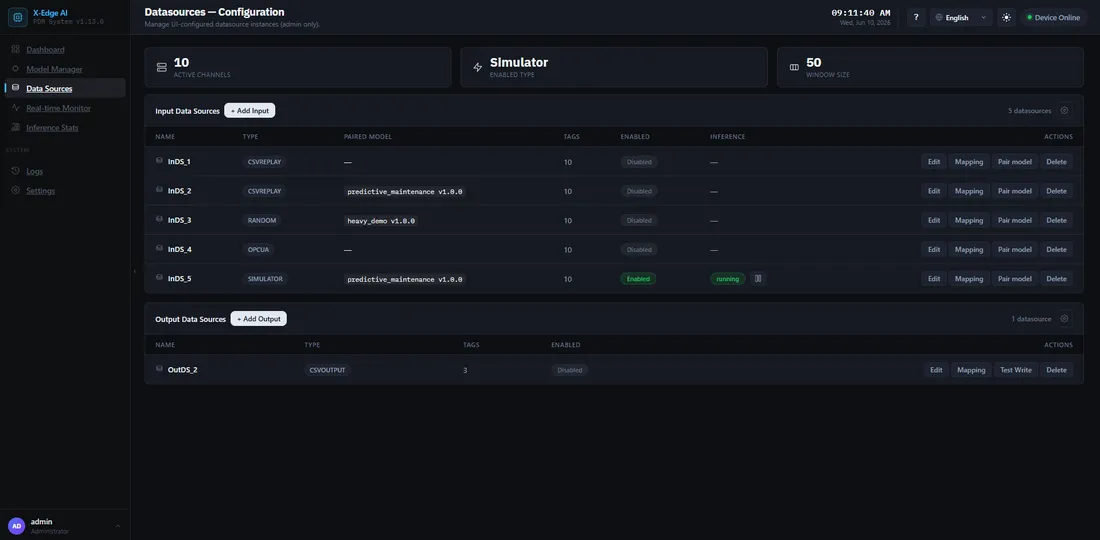
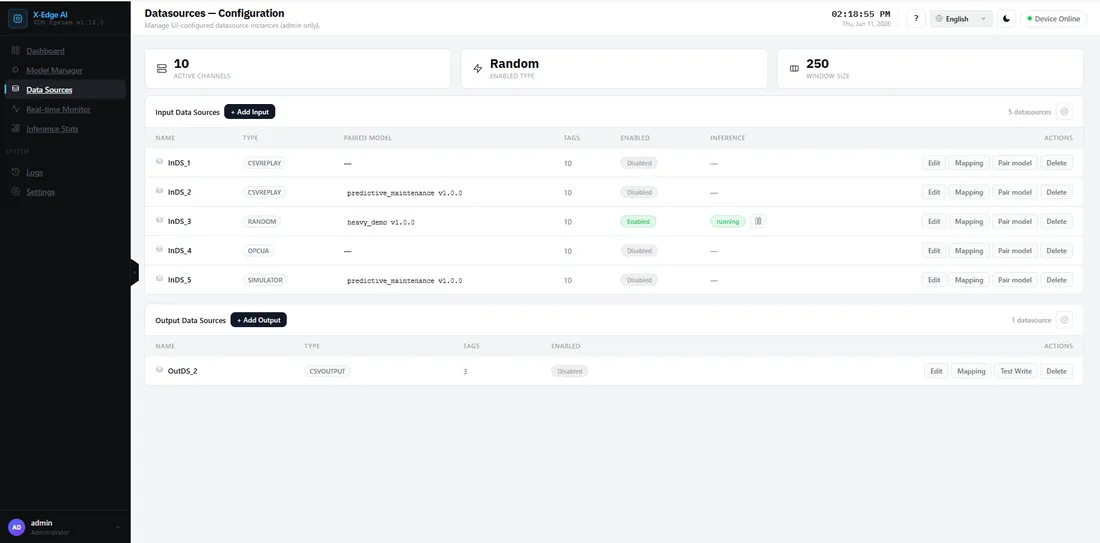
Supported input sources
Section titled “Supported input sources”- OPC-UA — subscribe to tags from any compliant server.
- MQTT — bring-your-own broker, TLS supported.
- CSV — replay recorded data from a file (great for testing).
Walkthrough: add a source and start inference
Section titled “Walkthrough: add a source and start inference”-
Open the Datasources page
Section titled “Open the Datasources page”In the dashboard, go to Datasources → Input, then click + Create.
-
Pick the adapter type and fill the connection
Section titled “Pick the adapter type and fill the connection”Select the source type. The form adapts to the protocol you choose — fill in the endpoint, credentials, and any protocol-specific fields. Secret fields (passwords, tokens) are masked as
***after saving.Field Example Endpoint opc.tcp://your-opcua-host:4840/factory/line1Security policy None(or aBasic256Sha256profile with certificates)Authentication Anonymous(or username/password)Tags are referenced by NodeId, e.g.
ns=2;i=2(numeric) orns=2;s=Temperature(string).Field Example Broker URL mqtt://your-broker-host:1883(ormqtts://for TLS)Base Topic factory/line1/#— used for Browse/Test Connection discovery; leave empty to fall back to#(whole broker)Client ID optional (leave blank to auto-generate a unique id) Username / password optional (masked on save) Tag names are the full topic path (e.g.
factory/line1/temp). Once a flow using this datasource is enabled, the adapter subscribes only to its mapped tags — not the Base Topic wildcard — so the broker forwards just what you mapped. Use Browse to discover tags from traffic observed on the Base Topic (MQTT has no topic-enumeration API, so the adapter waits briefly for messages); a topic that never publishes during that window needs a hand-typed tag. String payloads (e.g. aRUN/STOPstatus topic) never become tags.Field Example File a recorded dataset to replay Columns the sensor columns to feed as channels CSV is replay-only — useful for testing a model without a live plant connection.
-
Map tags to model channels
Section titled “Map tags to model channels”Save the form, then click Mapping on the datasource’s row. The drawer shows one fixed row per channel,
Ch 0toCh N-1, where N is the datasource’s Tag count. Each channel feeds one model input. Set Tag count and Window size (how many consecutive samples the model consumes per prediction) in the datasource form, to match the model you will run.- Open a row and type or pick its tag. Clear the tag to unmap that channel.
- Click Browse tags to discover tags from the source, then Fill empty channels to place them. It fills only empty rows, lowest channel first, in the order the source returned the tags. It skips tags already mapped and never overwrites a row. Filled rows are marked auto-filled until you save. Cancel discards them.
- Click Save. You can save a partial mapping and finish it later; a message says how many channels are still unmapped.
A flow can be enabled only when every channel is mapped, with no tag used twice. A saved tag on a channel the datasource no longer has is flagged in the drawer and removed when you save. String tags (e.g. a
RUN/STOPstatus) cannot be used as numeric features — leave them out. -
Next: create a flow
Section titled “Next: create a flow”To run this datasource, create a flow that binds this input to a model and its outputs, then enable the flow and press Start.
Conditional fields and switches
Section titled “Conditional fields and switches”The config form only shows fields relevant to what you’ve already chosen. On the MQTT tab, TLS fields (CA certificate, client cert/key, allow-untrusted) appear only once TLS is switched on. On the OPC UA tab, client certificate/key fields appear only under Certificate authentication, and username/password only under Username/Password authentication. Every on/off switch in the form shows its state as a check or cross inside the track, not by colour alone.
Security modes: Insecure, TLS, and Secure
Section titled “Security modes: Insecure, TLS, and Secure”Every network protocol can run in three postures. Pick the highest one your endpoint supports — Insecure is for bench and lab work only, never for a plant network.
Certificates referenced below live in /opt/aiboard/certs/ on the box, mounted
read-only into the backend at /certs (enable with AIBOARD_CERTS_ENABLED=1 in
/opt/aiboard/.env). Config fields accept only paths under /certs — anything
outside the jail is rejected. Copy only the CA certificate and the client
certificate/key pair to the box; the CA private key and broker/server keys must
never leave your PKI host.
OPC-UA
Section titled “OPC-UA”| Field | Value |
|---|---|
| Security policy | None |
| Message security mode | None |
| Authentication | Anonymous |
No encryption, no identity — anyone on the network can read tag values and impersonate the server. Acceptable only against the local demo lab or an air-gapped bench.
| Field | Value |
|---|---|
| Security policy | Basic256Sha256 |
| Message security mode | Sign or SignAndEncrypt |
| Authentication | Username/Password |
| Server CA certificate | /certs/ca/ca.crt |
The channel is signed/encrypted and the server proves its identity against the CA you provide. Leave Accept untrusted certificates off — switching it on silently disables the server identity check.
| Field | Value |
|---|---|
| Security policy | Basic256Sha256 (or Aes256_Sha256_RsaPss if the server supports it) |
| Message security mode | SignAndEncrypt |
| Authentication | Certificate |
| Server CA certificate | /certs/ca/ca.crt |
| Client certificate / key | /certs/clients/opcua-user.crt · /certs/clients/opcua-user.key |
Mutual authentication: the box proves its identity with a client certificate and the server is verified against your CA. Register/trust the client certificate on the OPC-UA server first, or the handshake is rejected there.
| Field | Value |
|---|---|
| Broker URL | mqtt://broker-host:1883 |
| TLS | off |
| Username / password | empty (anonymous) |
Plaintext and anonymous — readable and spoofable by anyone on the segment. Lab use only.
| Field | Value |
|---|---|
| Broker URL | mqtts://broker-host:8884 |
| TLS | on |
| CA certificate | /certs/ca/ca.crt |
| Username / password | broker account (masked after save) |
The broker proves its identity via TLS; the box authenticates with credentials. Leave Allow untrusted certificates off in production — it exists only to unblock bench setups with self-signed brokers.
| Field | Value |
|---|---|
| Broker URL | mqtts://broker-host:8883 |
| TLS | on |
| CA certificate | /certs/ca/ca.crt |
| Client certificate / key | /certs/clients/mqtt-client.crt · /certs/clients/mqtt-client.key |
Mutual TLS: both sides present certificates. Combine with a broker ACL that limits this client to exactly the topics it needs — the box subscribes only to mapped tags, so a tight ACL costs nothing.
CSV is file-based — there is no network channel to secure. The protections are filesystem-level and already enforced:
- File paths are jailed under the CSV root (
/data/csvin the container,AIBOARD_CSV_ROOT); path-traversal attempts are rejected. - Mount replay datasets read-only, and keep the CSV volume on the box — exporting it off-box is a data-governance decision, not a datasource setting.
Test the connection first
Section titled “Test the connection first”Before you enable a flow, use Test Connection on the source. It verifies the live form values reach the endpoint, so you catch a wrong host or credential before wiring tags.
MQTT: staleness window, reconnect, and non-finite rejection
Section titled “MQTT: staleness window, reconnect, and non-finite rejection”MQTT pushes readings; inference pulls one sample per tick. A cached tag value expires
after clamp(50 × Sampling period, 5s, 60s), and never sooner than one sampling period
— at the default 100 ms that’s 5 seconds. Past that window a stale tag raises a read
failure and halts inference, the same as if the sensor had gone quiet.
On broker loss, the adapter reconnects with exponential backoff and re-subscribes to its mapped topics on every attempt, until the flow is disabled.
NaN and Infinity payloads (including numeric overflow, e.g. 1e400) are rejected at
the parser and never reach the model. A topic that publishes NaN as a
no-measurement sentinel will halt inference by design — the same contract as a sensor
that goes quiet.
Rate limiting and buffering
Section titled “Rate limiting and buffering”Each datasource has independent rate limits and a bounded buffer. When a source produces faster than the runtime consumes, backpressure is reported to the dashboard so you can spot saturation.
If something goes wrong
Section titled “If something goes wrong”| Symptom | Likely cause |
|---|---|
| Flow enable rolls back with “Could not connect to the datasource” | Endpoint unreachable, wrong credentials, or firewall — verify with Test Connection. |
Flow enable fails with exactly_N_tags_required | Some channels are unmapped. Open Mapping and fill every row. |
| A model is missing from the flow’s model list | Its input shape does not match this datasource’s window size × tag count. |
| Flow shows Enabled but no predictions | By design — press Start in the flow’s Inference column. |
Tag mapping fails with a tag_outside_subscription_* message | The tag’s topic falls outside the datasource’s Base Topic — widen Base Topic or fix the tag path. Tag-mapping errors render as a sentence, not a raw code. |
| Inference halts after running fine for a while | A mapped MQTT topic aged past the stale window (slow publisher) — see staleness above. |
See the Troubleshooting runbook for more.