
모니터링
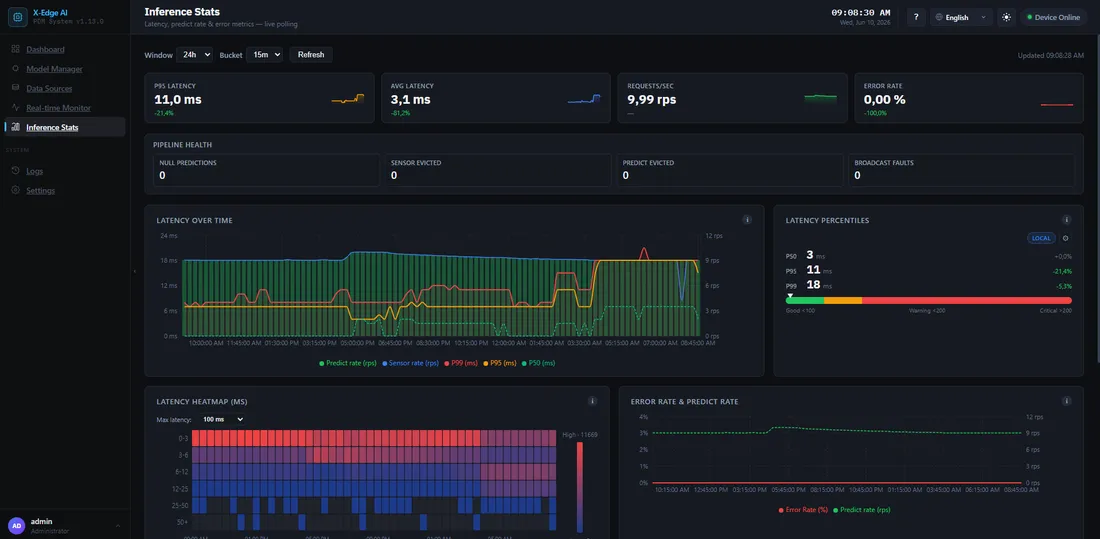
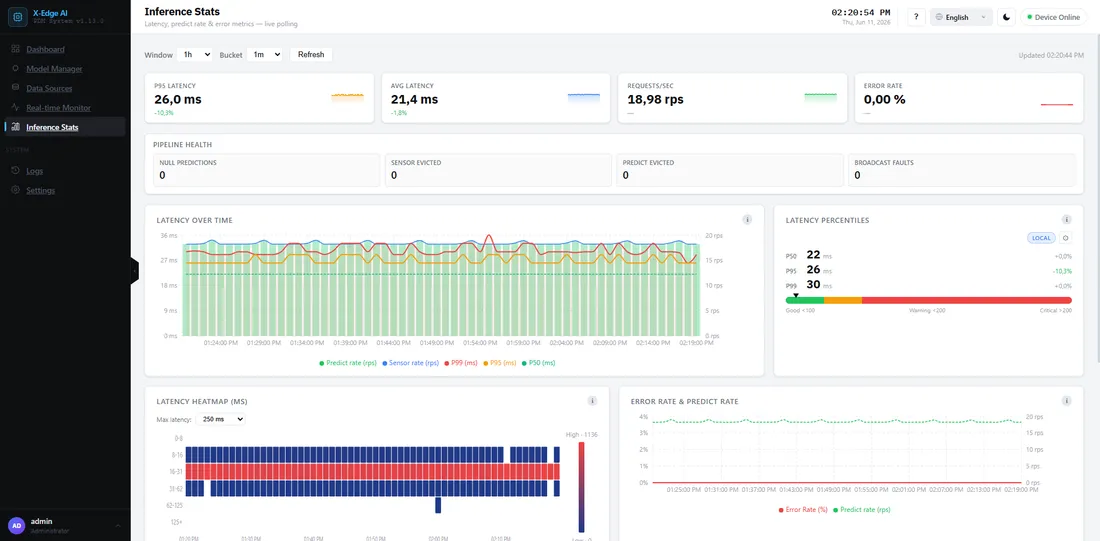
추론 통계(Inference Stats) 대시보드는 런타임이 실시간으로 어떻게 동작하는지 보여줍니다. 지연 시간, 처리량, 오류율, 그리고 파이프라인에서 시간이 어디에 소비되는지를 보여줍니다. 데이터소스가 스트리밍되는 동안 지속적으로 업데이트됩니다.
주요 지표
섹션 제목: “주요 지표”- 지연 시간 백분위수 — 종단 간 추론 시간의 p50 / p95 / p99.
- 처리량 — 초당 예측값.
- 오류율 — 실패한 추론의 비율.
- 실행 공급자 — 추론이 CUDA에서 실행되는지(CPU는 폴백). GPU 박스가 CPU로 폴백하면 여기에 표시됩니다.
지연 시간 분석
섹션 제목: “지연 시간 분석”각 추론은 시간이 어디로 가는지 볼 수 있도록 분해됩니다.
- 큐 대기 — 요청 큐에서 대기한 시간
- 전처리 — 입력 정규화
- 모델 실행 — 순수 추론 시간
- 후처리 — 출력 디코딩
지연 시간이 증가하면, 이 분석을 통해 모델 자체가 느려졌는지 아니면 박스가 업스트림에서 포화 상태인지 알 수 있습니다.
윈도우 및 버킷 컨트롤
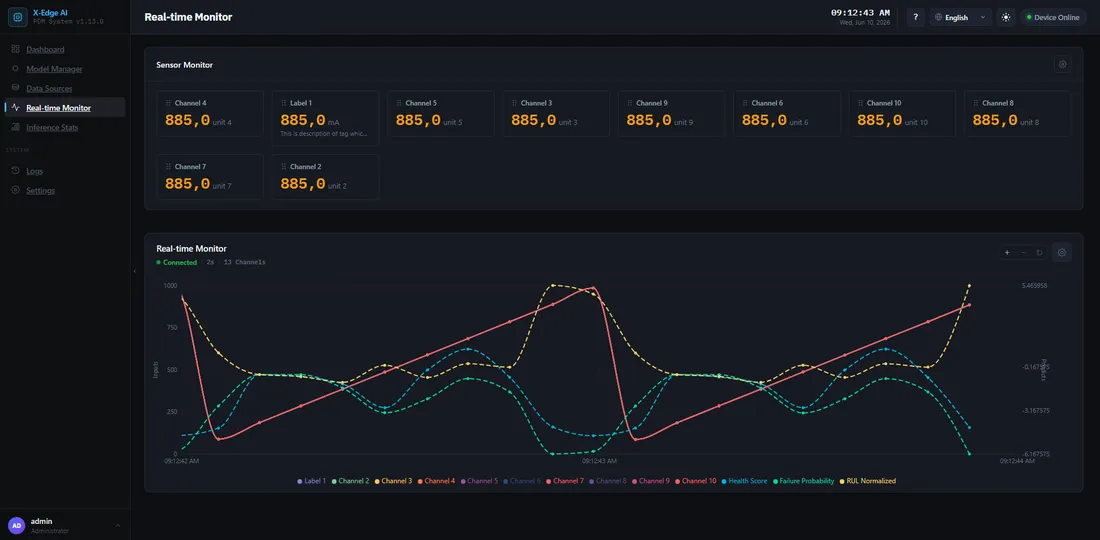
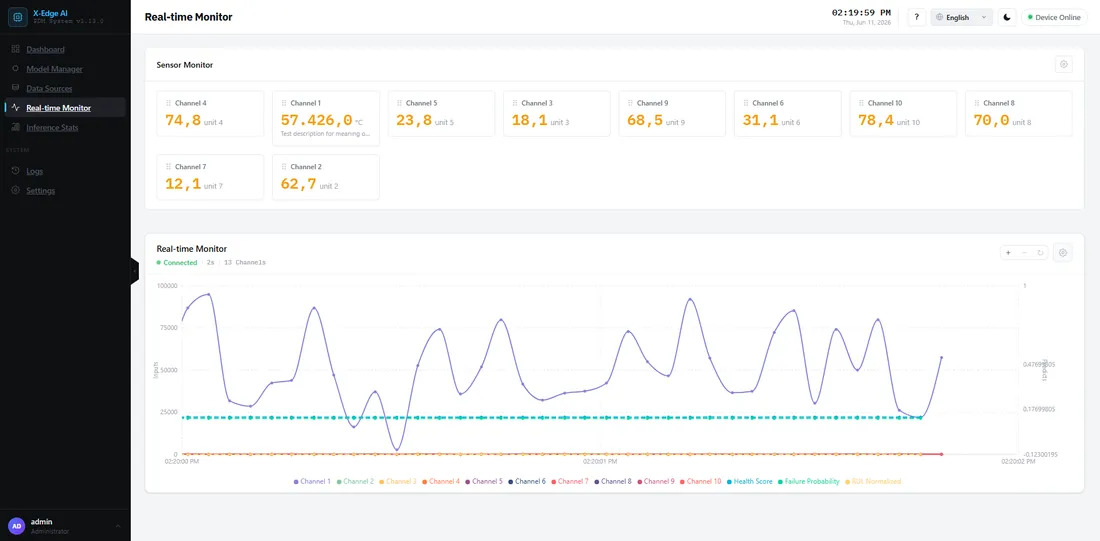
섹션 제목: “윈도우 및 버킷 컨트롤”두 가지 컨트롤이 시간 보기를 형성합니다.
- 윈도우 — 얼마나 과거까지 보는지 (예:
5m,1h,24h). - 버킷 — 차트의 각 포인트 폭이 얼마나 넓은지 (예:
10s,1m).
포인트 수는 window ÷ bucket입니다. 차트를 읽기 쉽게 유지하기 위해 윈도우를 변경하면
대시보드가 버킷을 자동으로 스냅합니다 — 더 넓은 윈도우는 더 넓은 버킷을 사용합니다.
새 설치 읽기
섹션 제목: “새 설치 읽기”차트에 “데이터 없음”이 표시되면, 가장 흔한 이유는 다음과 같습니다.
- 아직 스트리밍 중인 플로우가 없음. 플로우를 활성화한 뒤 **시작(Start)**을 누르세요. 한 번에 하나의 플로우만 실행됩니다.
- 설치가 아직 워밍업 중임 — 첫 번째 윈도우의 샘플을 기다리세요.
상태 카드
섹션 제목: “상태 카드”대시보드의 시스템 상태 모니터에는 GPU, CPU, 메모리, 스토리지, 서비스별로 카드가 하나씩 표시됩니다. 값이 임계값을 넘으면 카드와 각 행에 경고 또는 위험 상태가 표시됩니다. 이 섹션은 메모리, 스토리지, GPU 메모리 값을 다룹니다.
메모리 상태
섹션 제목: “메모리 상태”이 카드는 컨테이너 하나가 아니라 장치 전체를 측정합니다.
- RAM — 박스에서 사용 중인 메모리. 게이지도 같은 값을 표시합니다.
- 스왑 — 사용 중인 스왑. Jetson에서 스왑은 zram, 즉 같은 RAM 안의 압축 공간입니다.
- 추론 — 추론 컨테이너의 메모리를 해당 컨테이너에 설정된 메모리 한도와 비교합니다. 컨테이너가 한도에 도달하면 시스템이 이를 중지하고 다시 시작하며, 복구될 때까지 추론이 멈춥니다.
스토리지 상태
섹션 제목: “스토리지 상태”이 카드는 데이터베이스가 있는 디스크를 측정합니다.
- 디스크 — 사용한 공간과 전체 크기. 게이지는 사용 비율을 표시합니다.
- 여유 — 여유 공간(GB).
- 데이터베이스 — 데이터베이스 파일의 크기.
상태는 여유 공간을 백분율과 GB 두 가지로 판단합니다. 백분율만으로는 큰 디스크에서, GB만으로는 작은 디스크에서 오해를 부릅니다. GB 기준은 업데이트할 공간을 남겨 둡니다. 업데이트는 데이터베이스 백업을 만들고 새 번들을 풀기 때문에 함께 몇 GB가 필요합니다.
GPU 메모리
섹션 제목: “GPU 메모리”GPU 상태 카드의 메모리 행 이름은 측정 대상을 나타냅니다:
- 메모리 (RAM 공유) — GPU에 전용 메모리가 없어 시스템 RAM을 사용합니다. Jetson TX2가 이 경우이므로, 이 행과 메모리 카드의 RAM 행은 같은 메모리를 읽습니다.
- VRAM — 별도 그래픽 카드의 전용 메모리.
임계값
섹션 제목: “임계값”| 항목 | 경고 | 위험 |
|---|---|---|
| RAM | 80 % 초과 | 90 % 초과 |
| 스왑 | 75 % 초과 | 단독으로는 위험이 되지 않음 |
| 추론 컨테이너 | 한도의 80 % 초과 | 한도의 90 % 초과 |
| 스토리지 여유 공간 | 15 % 미만 또는 10 GB 미만 | 5 % 미만 또는 3 GB 미만 |
| GPU 메모리 | 80 % 초과 | 90 % 초과 |
조치 방법
섹션 제목: “조치 방법”- 메모리 경고 또는 위험 — 먼저 추론 행을 확인하세요. 한도 가까이에 머무는 컨테이너는 재시작될 위험이 있습니다. 최근에 바뀐 모델이나 Flow가 있는지 확인하고, 위의 추론 통계와 비교하세요.
- 스토리지 경고 — 데이터베이스 행을 확인하세요. 데이터베이스가 크다면
디스크가 가득 참 / 데이터베이스가 무한정 증가함을
참조하세요. 업데이트할 때마다 데이터베이스 백업도 몇 개 보관됩니다.
환경 변수의
AIBOARD_BACKUP_KEEP을 참조하세요. - 스토리지 위험 — 다음 업데이트 전에 공간을 확보하세요. 이 수준에서는 업데이트를 끝까지 진행할 공간이 부족할 수 있습니다.
로그 페이지는 백엔드와 추론 서비스의 로그 줄을 스트리밍합니다. 소스, 레벨, 텍스트로 필터링하고, 실시간을 끄면 스트림이 일시정지됩니다.
데이터 소스를 읽거나 쓰는 동안 기록된 줄에는 메시지 아래에 컨텍스트가 표시됩니다:
- ↓ 이름 (#id) — 해당 줄이 속한 입력 데이터 소스.
- ↑ 이름 (#id) — 해당 줄이 속한 출력 데이터 소스.
- #xxxxxxxx — 틱. 틱은 하나의 주기입니다: 입력 읽기, 엔진 호출, 각 출력 쓰기.
데이터 소스 이름은 해당 줄이 기록된 시점의 이름으로 표시됩니다.
틱 칩을 클릭하면 입력 읽기부터 각 출력 쓰기까지 그 틱의 모든 줄이 표시됩니다. 새 줄이 틱을 밀어내지 않도록 실시간이 일시정지됩니다. 필터 바에 틱 태그가 나타납니다. 태그를 닫거나 실시간을 다시 켜면 전체 줄로 돌아갑니다.
비자발적 중지 및 재시작 복구
섹션 제목: “비자발적 중지 및 재시작 복구”활성화하는 대상은 플로우(입력 하나, 모델 하나, 그 출력)이며, 한 번에 하나의 플로우만 실행됩니다. 아래의 어떤 중지에서든 복구하려면 원인을 고친 뒤 플로우를 껐다가 다시 켜고 Start를 누르세요.
- 추론이 중지되었는데 아무도 Stop을 누르지 않았나요? 알림을 확인하세요. 직접 요청하지 않은 중지는 조용히 실패하는 대신 그곳에 Warning 수준 알림을 발생시킵니다. 원인: 누군가 다른 플로우를 활성화했거나, 활성화된 플로우를 삭제했거나, 실행 중에 플로우가 사용하는 입력 데이터소스를 편집한 경우입니다.
- 추론 중지 배너. 스트리밍 중 추론에 장애가 나면(예: 태그 응답 중단) 대시보드에 사유와 함께 추론이 중지되었습니다 배너가 표시됩니다. 플로우는 여전히 활성화로 표시되지만 모델은 언로드된 상태입니다.
- 백엔드 재시작 후, 추론 서비스가 정상(healthy)을 보고하면 활성화된 플로우는 스스로 Ready로 돌아옵니다. 스트리밍은 자동으로 재개되지 않습니다. Start를 누르세요. 복원에 실패하면(예: 입력이 아직 연결되지 않음) 플로우는 활성화 상태로 남고 추론은 유휴 상태로 유지됩니다. 플로우를 껐다가 다시 켜서 재시도하세요.
- 스트리밍 중 추론 서비스가 재시작되면, 박스가 스스로 플로우를 복원하고 스트리밍을 재개합니다. 최대 세 번 시도합니다. 그래도 실패하면 추론이 중지되었다는 오류 알림이 표시됩니다.
문제가 발생하면
섹션 제목: “문제가 발생하면”- 빈 차트, 예기치 않은 CPU 폴백, 또는 증가하는 오류율 — 문제 해결 런북을 참조하세요.